
File Format & Submission Guidelines
We want to print your banner perfectly the first time around (and virtually always do) but we need your help to do that. It is important that the files that you submit to us reflect exactly what you want us to print, including proper color, cropping and content. We encourage you to you check your file(s) for typos and spelling errors, dimensions, correct layout, resolution, embedded color profile (important!) and view at 25% or 50% size to check for pixelation and jaggies (especially on embedded bitmaps). Photoshop works well for this purpose, and it is the program that we will print from. You are solely responsible for reprinting and possible time delays due to corrections or customer changes and we will need to bill you for any additional services or printing.
If you are ordering banners to be used in a banner stand, please let us know in advance, as that will change the design parameters!
If you do not understand the following, or if you think "they really didn't mean they wanted the file that way" (we really do), then please advise us in advance rather then sending us files to "check out." We can help. We may charge for file evaluations after the first file (other than small jpg's for pricing), and for extensive color management and file assistance, as they both can consume a considerable amount of time if you are not familiar with them or send us files that do not meet our suggested specs. This also applies to calling the graphic artists listed in our Contact page for file help ~ please contact us first.
File Formats
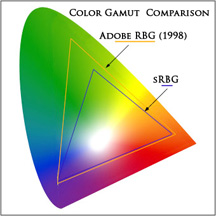
Our preferred file formats are JPG or PDF, 8-bit, Adobe RGB 1998 color space (NOT sRGB!) (and please, always embed your profile so that we have a color reference), 300dpi full print size for best quality for close viewing. You can use 200, 150 or 100dpi for distance or non-resolution critical viewing. For FULL BLEED on standard material print widths (24", 36", 42") (can be any length up to 50 feet) add 0.2" each direction (example: 36" x 96" would be 36.4" x 96.4") without crop marks ~ see details below. For full bleeds larger than 42" (and any length up to 50 feet) we will print on oversize material and crop, so we will need the same bleed plus crop marks. Please ask about custom sizes.
-
JPG or PDF. For JPG, use 8-bit, Highest Quality (Level 12 (preferred) or Level 10 in Photoshop) (NOTE: You can use Baseline sampling). Please do NOT send us files with lower quality levels, as they will not print well. We can also print in 16-bit for special applications for even wider gamut. For PDF files please use Print Quality.
-
Adobe RGB 1998 color space (preferred), and we will accept sRGB (a color space designed for web use) and CMYK (a color space for offset printing) and REQUIRE an embedded profile, otherwise we have no color reference, and cannot be responsible for the output. Adobe RGB (1998) color space has a wider gamut (range of colors) and suggest that you work in this color space, although if you created the file in sRGB or CMYK, there will be no benefit to converting it to Adobe RGB 1998.
-
PLEASE MAKE SURE THAT YOUR FILE HAS THE CORRECT PROFILE EMBEDDED, OR YOUR COLORS MAY BE OFF, AND WE CANNOT BE RESPONSIBLE FOR THE OUPUT.
-
File Resolution: 300dpi (Preferred) at 100% print size especially for display graphics. For very large banners or for greater viewing distances, file sizes can be 200dpi, 150dpi or even 100dpi, all at full size (including all printable area only, no cropping). Many graphics programs, including Photoshop and Illustrator, cannot export jpg files large enough to use full 300dpi or even 200dpi for really large banners. While the 64-bit version of Photoshop CS4 is limited in size only by the printer driver (we have gone up to 90,000 pixels on a side so far), pre-CS4 Photoshop and all other Adobe sofware, has a 30,000 pixel per side limit for exporting or printing. We also have excellent software to up-res the image as needed.
-
File Dimensions For non-bleed printing please make the file size 100% of the printed size without bleed or crop marks. For FULL BLEED printing on standard material widths 24", 36"and 42", please add a 0.2" bleed (0.4" to the height and width) and NO CROP MARKS please. For FULL BLEED on non-standard width material, please include the same bleed area but INCLUDE CROP MARKS. Thanks!
-
TIFF files are acceptable, and are NOT preferred as files will be much larger and no effective quality improvement over jpg and can take a very long time for you to upload them and a long time for us to download with no effective gain.
-
If you have a vector file (PDF, AI, EPS, etc.) from a program such as Adobe Illustrator, InDesign or Corel Draw, please Export the file (in Illustrator use File, Export) to a full-res, full size jpg or PDF file (see file requirements at top of this page) before sending. If you are having trouble Exporting (you may not have enough RAM (memory) or Scratch Disk Space (Hard Drive/s) save your vector file, open it in Photoshop and then save as a jpg. You can also send a vector file, but you will be charged a nominal fee to convert to a jpg file and it may delay your job. About 50% or more of the vector files that we get have problems, such as wrong borders, cropping issues, font issues, etc, causing delays and additional costs. It is very rare that we have trouble with jpg files. Also, please make sure to flatten and to outline any fonts required. There is NO quality advantage printing from a vector file over a properly prepared jpg file. HINT: Before exporting a file with white space from Illustrator, please put crop marks into the Illustrator file and export the cropped area only (do not include borders or crops marks in the exported file ~ only the printable area) If you don't, you may export only the designed area and not the total image area, creating centering and white space problems in printing.If you are sending a PDF file, please allow extra time and make sure that you save for print at highest quality and not for web (or your file will be too small for anything but the smallest output. You can check your file by opening it or placing it into a program such as Photoshop.
File Names
PLEASE include your company name or personal name in the file, such as acmecompany_myfilename.jpg. This will help is in our file management and prevent duplicate files of the same name. If you revise a file, PLEASE add "_rev2" as an example, to the new file. If you are using our FTP, you can also remove the old file from our site.
Suggestions:
-
It is better to NOT edit images in JPG format. Since the JPG format by definition resamples each time it saves, it will degrade image quality. Please edit images in a non-resampling, non-degrading format such as TIFF, AI, etc. and then save as a JPG or PDF after all changes have been made.
-
If you want "white borders" on your banners, make sure you include them as part of the printable image. No crop marks or margins in final file for standard roll width printing, but crop marks are required for less than material width prints.
File Submission
We prefer to receive files via the web. You may email files up to 10MB to upload@greenbanners.com. Please attach the file instead of embedding it (In Outlook: Use Insert, File instead of Insert, Picture). For files over 10MB we prefer that you either:
1) Use YouSendIt.com for free file transfers up to 100MB or larger for a small fee. This is a great, free service and often the easiest way for you to send us files as it automatically sends us an email when the upload is completed. Using your internet browser, go to www.yousendit.com and follow the instructions. Use upload@greenbanners.com as the Send To email address. Please Note: With YouSendIt.com, you have options for setting up free or paid-for accounts. The simplest option requiring a minimum of set-up time requires that you DO NOT click on the account option check boxes located in the lower section of the "Send a file now" dialog box.
2) Use our FTP site to upload to the GreenBanners.com website directly. Please request a user name and password when you complete the Information Form (START HERE). You may request a username and password to use our (free) FTP service. Also, when using FTP, please email us at upload@greenbanners.com to let us know that you have sent us your file(s).
Please let us know if you have questions or any difficulty in sending us files and we will be happy to assist you.
Color Management
Our systems are completely color-managed, from calibrated monitors to fully profiled printers/ink/media combinations. We highly encourage you to use a color-calibrated system to insure that your files are color accurate so your banner and signage will be exactly what you were wanting. And thanks for reading the entire page!
©2013 Don Jackson Photography